Abstract Vector Shapes Background Guide
Visual consistency is the backbone of modern digital branding. Whether you are curating an Instagram feed, designing a wedding invitation suite, or building a website banner, the foundation of your design often determines its perceived value. This is where an Abstract Vector Shapes Background becomes an indispensable asset. Unlike standard stock photography, which can feel generic or restrictive due to lighting and composition constraints, abstract vector art offers a blend of artistic fluidity and technical precision.
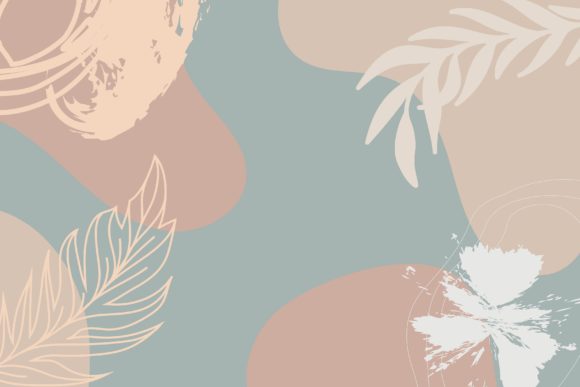
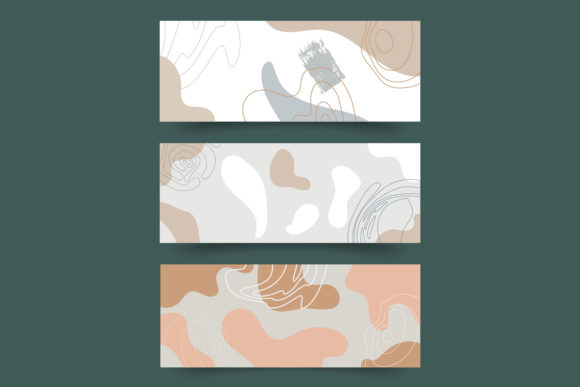
The specific collection featuring trendy abstract backgrounds with leaves, watercolor textures, and neutral tones represents a shift toward organic minimalism. These designs are not merely decorative; they are functional tools that solve common design problems for a wide range of users. By understanding what these assets are and how they function, you can determine if they align with your current creative or business goals.
Understanding the Hybrid Design Approach
To appreciate the utility of these assets, it is helpful to understand their construction. The term "vector" refers to graphics defined by mathematical paths rather than pixels. This means they can be scaled infinitely without losing quality. However, pure vector art can sometimes appear cold or overly geometric. The designs in question bridge this gap by incorporating hand-drawn watercolor illustrations that are then processed through Adobe Illustrator.
This hybrid approach results in high-quality files, typically delivered at 1800×1800 pixels with 300 PPI (pixels per inch), ensuring crispness for both digital screens and print materials. The inclusion of transparent files is crucial. It allows designers to layer these abstract shapes, pampas grass, ferns, and tropical palm leaves over other content without awkward white boxes or rigid borders. The color palette—dominated by nude, peach, blush, and beige—reflects current trends in luxury beauty and interior architecture, offering a sophisticated backdrop that does not compete with foreground text or products.
Perspectives from Different Creators
The value of an Abstract Vector Shapes Background varies significantly depending on who is using it. A one-size-fits-all explanation rarely captures the full utility of such versatile assets. Here is how different groups might evaluate and utilize these resources.
For Social Media Managers and Bloggers
Speed and consistency are the primary currencies for social media professionals. Creating unique stories and feed posts daily is exhausting. A bundle of isolated, editable elements allows for rapid content creation. Instead of starting from a blank canvas, a blogger can drag a pastel watercolor frame onto their template, add their text, and have a polished post ready in minutes. The neutral tones ensure that the background complements various product photos, whether it is a new lipstick shade or a home decor item, maintaining a cohesive brand aesthetic across platforms like Instagram and Pinterest.
For Small Business Owners and Entrepreneurs
For entrepreneurs in the beauty, jewelry, or cosmetics sectors, brand perception is everything. Cheap or cluttered graphics can undermine trust. High-quality, minimalist vector designs convey professionalism and attention to detail. These business owners often lack the budget for custom illustration commissions. Access to a library of luxurious beige and blush frames provides a cost-effective way to achieve a high-end look. They can use these assets for digital ads, email headers, or even packaging inserts, ensuring their visual identity remains premium without the premium price tag.
For Wedding Planners and Event Designers
The wedding industry relies heavily on aesthetics. Couples often seek invitations and save-the-dates that feel personal and elegant. Watercolor brush textures and botanical elements like ferns and pampas grass are perennial favorites in wedding design. For planners, having editable vector files means they can customize colors to match specific wedding themes. If a couple wants a slightly darker sage green instead of the default pastel, the vector format allows for easy color adjustment. This flexibility is vital for creating bespoke experiences for clients.
For Educators and Hobbyists
Not everyone using these assets is a professional designer. Educators creating presentation slides or hobbyists making digital journals benefit from the ease of use. The "drag-and-drop" nature of isolated elements lowers the barrier to entry. A teacher might use the abstract shapes to create engaging slide backgrounds that are visually interesting but not distracting. A hobbyist might use the terrazzo and marble textures to design printable planner stickers. For these users, the learning curve is minimal, and the immediate visual improvement to their projects is significant.
Evaluating Quality and Usability
When selecting digital assets, several factors determine their long-term usefulness. Understanding these priorities helps you decide if a particular package meets your needs.
- File Format and Compatibility: Ensure the package includes EPS files for vector editing in software like Adobe Illustrator or CorelDRAW, as well as high-resolution PNGs for users who prefer Photoshop or Canva. Transparent backgrounds are non-negotiable for seamless integration.
- Resolution and Print Readiness: Digital-only assets may suffice for web banners, but if you plan to print invitations or business cards, 300 PPI is essential. The 1800×1800 pixel dimension offers a good balance, providing enough detail for most square-format prints while keeping file sizes manageable.
- Editing Flexibility: True vector files allow you to change colors, resize elements, and modify shapes without quality loss. Check if the layers are organized and if the watercolor textures are properly masked. This level of control is what separates professional-grade assets from basic clip art.
- Aesthetic Versatility: While trendy colors like nude and blush are popular, consider whether the style is too niche. Abstract shapes with natural elements tend to have broader appeal than highly specific thematic graphics, making them a safer investment for diverse projects.
Practical Integration Tips
Once you have downloaded and extracted the ZIP file containing your transparent designs, the next step is integration. Do not simply place the image and leave it. To maximize the impact of your Abstract Vector Shapes Background, consider layering. Place a subtle marble texture at the bottom, add a watercolor leaf element in the corner, and use a solid pastel shape to highlight key text. This depth creates a more dynamic composition.
For web banners, ensure that the abstract elements do not obscure readability. Use the negative space within the vector frames to position your call-to-action buttons or headlines. In social media stories, use the animated features of your platform to make static vector elements appear to float or fade in, adding motion to the stillness of the watercolor texture.
Ultimately, these assets are tools for expression. Whether you are a seasoned graphic designer looking to speed up your workflow or a small business owner aiming to elevate your brand presence, the right background sets the tone. By choosing high-quality, editable, and aesthetically pleasing vector shapes, you invest in the visual clarity and professional appeal of your content. Take the time to explore the different elements in the bundle, experiment with combinations, and find the style that best communicates your unique message.