Integrating Mountains Silhouette Assets into Professional Design Workflows
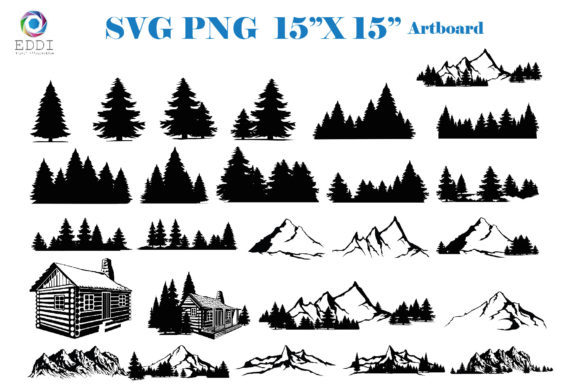
In the landscape of modern digital design, efficiency and versatility are paramount. Whether you are a graphic designer crafting a brand identity, a small business owner creating marketing materials, or a hobbyist working on personal projects, the quality of your foundational assets determines the speed and polish of your final output. This is where a curated collection of Mountains Silhouette icons becomes more than just a decorative element; it becomes a functional tool in your creative arsenal. A set of 25 professionally designed mountain, tree, and house silhouettes offers a streamlined solution for diverse applications, from logo design to physical product creation.
Understanding how to integrate these vector graphics into your existing workflow requires a shift in perspective. Instead of viewing these files as static images, consider them as modular components that can be adapted, scaled, and repurposed across multiple platforms. The key to maximizing their value lies in recognizing their dual-format nature—SVG and PNG—and leveraging each format for its specific strengths within your production pipeline.
The Strategic Value of Vector-Based Silhouettes
When incorporating natural elements like mountains into your designs, consistency and scalability are critical. Raster images often fail when resized, leading to pixelation and a loss of professional quality. By utilizing Mountains Silhouette assets provided in SVG (Scalable Vector Graphics) format, you ensure that every line remains crisp, regardless of whether the final output is a tiny favicon or a large-format banner. This scalability is essential for maintaining brand integrity across various touchpoints.
Furthermore, the inclusion of complementary elements such as trees and houses allows for the construction of cohesive scenes. Rather than sourcing disparate elements from different creators—which often results in mismatched line weights and styles—this unified set ensures visual harmony. This pre-established consistency saves significant time during the refinement phase of a project, allowing you to focus on composition and messaging rather than technical adjustments.
Workflow Integration: From Concept to Execution
Integrating these assets into your workflow begins with preparation. Before diving into design software, it is crucial to organize your digital library. Since the download comes in a single ZIP folder containing both SVG and PNG files, establishing a clear folder structure on your drive will prevent bottlenecks later. Many professionals create separate directories for "Vector Assets" and "Raster Previews," ensuring that the correct file type is accessed depending on the task at hand.
Phase 1: Ideation and Layout
During the initial stages of a project, such as brainstorming a logo or planning a nursery print layout, the SVG format is your primary tool. Because SVGs are lightweight and editable, they can be imported directly into applications like Adobe Illustrator, CorelDRAW, or Inkscape. Here, you can manipulate the anchor points of the Mountains Silhouette to better fit your specific composition. You might stretch a peak to emphasize grandeur or combine multiple mountain icons to create a unique range. This flexibility is vital for customizing generic assets into bespoke design solutions.
For web designers and bloggers, these vectors can be embedded directly into HTML or CSS, allowing for dynamic styling. You can change the color of the silhouettes via code to match seasonal themes or brand updates without needing to re-export new image files. This capability significantly reduces the maintenance overhead for digital properties, making the assets a long-term investment rather than a one-time use resource.
Phase 2: Production and Fabrication
The transition from digital design to physical product is where the compatibility of these files truly shines. For entrepreneurs using cutting machines like Cricut Explore or Silhouette Cameo, the SVG format is the industry standard. These machines read the vector paths to guide the blade, ensuring precise cuts for stickers, decals, and iron-on transfers.
Before sending a job to the cutter, it is essential to verify that your software recognizes the layers correctly. Most cutting software allows you to ungroup the SVG elements, enabling you to separate the mountains from the trees or houses if needed. This layer control is crucial for multi-color projects or when applying different materials to different parts of the design. For instance, you might cut the mountains from vinyl and the trees from cardstock, layering them to create a textured, three-dimensional effect in scrapbooking or party decorations.
Phase 3: Digital Deployment and Printing
While SVGs dominate the editing and cutting phases, the included PNG files with transparent backgrounds serve a different but equally important role. Transparent PNGs are ideal for quick compositing in software that does not support robust vector editing, such as Canva, Microsoft Word, or certain photo editors. They are also the preferred format for web use when SVG implementation is not feasible, offering a reliable fallback that maintains transparency over any background color or image.
For printable products like nursery prints or invitations, the high-resolution artboard dimensions (ranging from 15x4 to 15x15 inches) ensure that the final print quality meets professional standards. When preparing files for print, always check the DPI settings of your document. Although vectors are resolution-independent, placing them into a raster-based print layout requires attention to detail to avoid unintended scaling issues. Using the provided PNGs can simplify this process for users who are less familiar with vector workflows, providing a "what you see is what you get" experience.
Compatibility and Technical Considerations
A smooth workflow depends heavily on tool compatibility. The Mountains Silhouette set is designed to work with a broad spectrum of software, including Adobe Suite, Inkscape, CorelDRAW, and various cutting machine applications. However, users must proactively verify their specific setup. For example, older versions of cutting software may require SVG files to be simplified or converted to DXF format. Understanding these nuances prevents frustration during critical production deadlines.
Additionally, consider the color profile of your projects. Vector files typically default to RGB, which is ideal for screens. If you are printing physically, ensure your design software converts the colors to CMYK appropriately. While black silhouettes are generally safe across color spaces, any customization involving colored fills should be checked against your printer’s gamut to ensure accuracy.
Maximizing Long-Term Utility
To get the most out of this digital download, think beyond immediate projects. These icons can serve as a foundational library for future work. By saving customized versions of the Mountains Silhouette—such as a specific color palette or a modified shape—you build a personal asset library that accelerates future tasks. This approach aligns with lean productivity principles, reducing the time spent searching for new resources for similar projects.
Moreover, these assets are excellent for educational purposes. Educators and parents can use the simple, clean lines of the mountains, trees, and houses for teaching materials, worksheets, or classroom decorations. The clarity of the silhouettes makes them easily recognizable for young learners, while the digital format allows for endless reproduction without degradation.
Conclusion
Incorporating a set of 25 Mountains Silhouette icons into your design toolkit is a strategic move toward greater efficiency and creative flexibility. By understanding the distinct roles of SVG and PNG formats, ensuring software compatibility, and organizing your digital assets effectively, you can seamlessly integrate these elements into both digital and physical workflows. Whether you are designing a logo, creating party invitations, or producing custom stickers, these versatile graphics provide the reliability and quality needed to elevate your projects. The true value lies not just in the images themselves, but in how they streamline your process, allowing you to focus on creativity and execution rather than technical hurdles.