Integrating Butterfly Design Assets into Your Creative Workflow
In the modern digital landscape, visual consistency and asset versatility are not just aesthetic preferences; they are operational necessities. Whether you are a small business owner managing your own branding, a freelance designer juggling multiple client deliverables, or an educator creating engaging classroom materials, the resources you choose directly impact your efficiency. Butterflies design elements represent more than mere decoration. They serve as adaptable components that can streamline the production of diverse media, from physical invitations to digital web interfaces. Understanding how to integrate these assets into your existing workflow allows for smoother execution, reduced turnaround times, and higher quality outputs.
The Strategic Value of Versatile Clipart
When selecting design elements, many creators overlook the importance of file format compatibility. A beautiful image is only useful if it fits seamlessly into your current toolset. The butterfly design collection described here is engineered for cross-platform utility. By providing files in PNG, SVG, and EPS formats, the asset pack addresses the technical requirements of both raster-based and vector-based workflows. This versatility ensures that you do not need to convert files manually, a process that often results in quality loss or transparency issues.
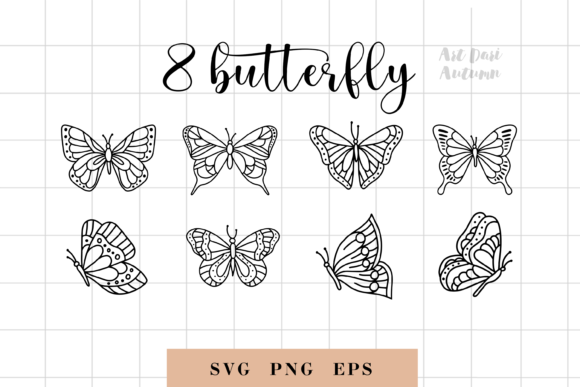
For professionals, time is a finite resource. Searching for individual elements, verifying their licensing, and adjusting their resolution for different mediums consumes valuable hours. Having a curated set of eight distinct butterfly elements, available individually and as a consolidated sheet, allows for rapid deployment. You can drag and drop these assets into your project knowing they are high-quality, watermark-free, and ready for immediate use. This preparation phase is critical; it shifts the focus from troubleshooting technical glitches to executing creative vision.
Pre-Production: Planning and Asset Organization
Effective implementation begins before you open your design software. Integrating Butterflies into your process starts with organization. Upon receiving the package, which includes eight individual PNGs, eight individual SVGs, and consolidated sheets in PNG, SVG, and EPS, establish a logical folder structure. Separate the raster images (PNG) from the vector files (SVG/EPS). This distinction is vital because each serves a different purpose in your workflow.
PNG files with transparent backgrounds are ideal for quick compositing in tools like Photoshop, Canva, or Procreate. They are pixel-based, meaning they have a fixed resolution. Use these when your output size is predetermined, such as for social media posts or standard-sized greeting cards. Conversely, SVG and EPS files are vector-based. They use mathematical paths rather than pixels, allowing them to be scaled infinitely without losing clarity. These should be reserved for large-format prints like posters, banners, or any application where the final dimensions might change during the design phase.
By categorizing these assets early, you create a reliable library. This reduces decision fatigue during the actual design process. When a client requests a last-minute change from a business card to a trade show banner, you already know which files to access. This foresight is a hallmark of professional workflow management.
Execution: Applying Assets Across Different Mediums
The true test of any design asset is its adaptability across various projects. The butterfly elements discussed here are suitable for a wide array of applications. Let us examine how they fit into specific creative contexts.
Digital Design and Web Integration
For bloggers, web designers, and digital marketers, lightweight and scalable graphics are essential. Using the SVG files for web design ensures crisp rendering on all devices, from mobile phones to 4K monitors. Because SVGs are code-based, they often load faster than high-resolution PNGs, contributing to better site performance and SEO outcomes. You can incorporate these butterflies into header images, blog post separators, or as subtle background patterns. The transparent background of the PNGs also makes them perfect for overlaying on photographs or colored sections without creating awkward white boxes around the edges.
Print Media and Physical Products
If you are involved in print-on-demand businesses, scrapbooking, or invitation design, quality control is paramount. The EPS file included in the sheet is particularly valuable here. Professional printing software, such as Adobe Illustrator or CorelDRAW, handles EPS files with precision. You can manipulate the nodes of the vector shapes to customize the butterfly’s form if needed, ensuring it aligns perfectly with your layout. For planner stickers and greeting cards, the high-resolution PNGs provide rich color depth. However, always check the DPI (dots per inch) settings in your software to ensure the print output remains sharp. Since the files are provided without watermarks, you can proceed to print immediately, avoiding the delays associated with purchasing extended licenses or removing protective overlays.
Educational and Productivity Tools
Educators and productivity enthusiasts often create custom materials to enhance engagement. Planner stickers, for instance, require consistent sizing and clear outlines. The individual SVG elements allow you to resize butterflies uniformly across a page of stickers, maintaining visual harmony. In educational settings, these images can be used to illustrate biology lessons, decorate classroom newsletters, or create rewarding visual cues for student progress charts. The simplicity of the design ensures that the imagery supports the content rather than distracting from it.
Post-Production: Quality Assurance and Consistency
Once the design is assembled, the workflow moves to review and export. This stage is where the benefits of using standardized assets become evident. Because all eight elements come from the same design family, they share a consistent artistic style. This coherence is crucial for brand identity. Whether you are designing a series of Instagram posts or a multi-page brochure, using elements from the same set ensures that your visual language remains unified.
During the quality assurance phase, check the alignment and layering of the butterflies. If you used the PNGs, ensure that the transparency has been preserved during export. If you used vectors, verify that all paths are closed and that no stray anchor points remain. For physical products, consider printing a test copy to evaluate color accuracy. Digital screens often display colors more vibrantly than printers can reproduce. Adjusting saturation and contrast in your editing software before final export can prevent disappointing results.
Long-Term Usability and Asset Management
A sustainable creative workflow considers the long-term value of purchased resources. The butterfly clipart set is not a one-time use item. It is a reusable component of your design toolkit. Store the original files in a cloud backup or an external drive to prevent data loss. Tagging these files with relevant keywords in your digital asset management system will make them easier to retrieve in future projects. For example, tagging them with "nature," "spring," "elegant," or "minimalist" allows you to find them quickly when a new project requires a similar aesthetic.
Furthermore, consider how these assets can be modified. While the designs are complete, they can serve as bases for further customization. You might change the color palette to match a seasonal campaign or combine multiple butterflies to create a larger, more complex pattern. This flexibility extends the lifespan of the asset, providing a higher return on investment. For entrepreneurs and small business owners, this ability to repurpose content is key to maintaining a consistent online presence without constantly creating new graphics from scratch.
Conclusion
Integrating Butterflies design elements into your creative process is a practical step toward greater efficiency and professional consistency. By understanding the technical differences between PNG, SVG, and EPS formats, you can select the right tool for each job. Organizing these assets before you begin designing saves time and reduces stress. Applying them across digital, print, and educational mediums demonstrates their versatility. Finally, maintaining a structured approach to quality control and asset management ensures that these resources continue to add value to your work over time. In a world where speed and quality are equally demanded, having reliable, high-quality design components at your disposal is not just a convenience; it is a strategic advantage.