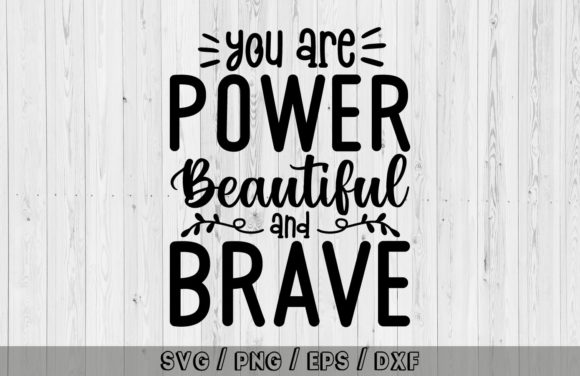
Unlocking Confidence: A Practical Guide to Using the "You Are Power Beautiful and Brave" Digital Cut File
In the world of digital crafting and custom merchandise, typography is more than just text; it is a vehicle for emotion. The phrase You Are Power Beautiful and Brave has resonated deeply with creators looking to produce items that inspire confidence and self-love. Whether you are running a small business selling print-on-demand apparel or a hobbyist creating personalized gifts, this specific design offers a potent combination of aesthetic appeal and meaningful messaging. However, possessing the file is only the first step. Many creators stumble not because they lack talent, but because they overlook the technical nuances of working with multi-format digital assets.
Understanding how to properly utilize this design can mean the difference between a professional-grade product and a frustrating DIY failure. This guide addresses common pitfalls associated with downloading, preparing, and applying the You Are Power Beautiful and Brave cut file, ensuring your final output matches the quality of the sentiment it carries.
The Trap of Ignoring File Format Specifics
One of the most frequent mistakes beginners make is assuming all digital files are interchangeable. When you download the zipped folder containing SVG, EPS, DXF, JPG, and PNG formats, it is tempting to grab the first file that opens. This approach often leads to poor resolution, jagged edges, or incompatible layers.
For instance, using a JPG or PNG for a vinyl cut project is a critical error. These raster images rely on pixels and do not contain the vector paths necessary for cutting machines to interpret where to cut. If you attempt to load a PNG into Silhouette Studio or Cricut Design Space for a cut operation without proper tracing, you will likely end up with uneven lines and wasted material. Conversely, using an SVG for a high-resolution sublimation print might result in unexpected scaling issues if the software does not handle vector-to-raster conversion correctly.
The Better Approach: Match the file format to your specific tool and end goal. Use SVG files for web-based cutting software like Cricut Design Space and Sure Cuts A Lot. Choose DXF if you are using the basic edition of Silhouette Studio, which does not support SVG imports without an upgrade. Reserve EPS for professional vector editing in Adobe Illustrator, CorelDraw, or Affinity Designer. For simple printing on paper or mugs where no cutting is required, the high-resolution PNG is often the safest bet for maintaining transparency and clarity.
Overlooking Software Compatibility and Settings
Another common oversight involves software compatibility. While the You Are Power Beautiful and Brave file is designed to work with a wide range of programs—including Brother’s ScanNCut Canvas, Make the Cut, and Inkscape—each platform handles font rendering and layer grouping differently. A frequent frustration arises when users open the file and find that elements are misaligned or grouped incorrectly.
This usually happens because the creator did not "weld" or "union" the shapes before saving, or the user’s software interprets the layers as separate objects. If you are sending this design to a laser cutter or a vinyl plotter, ungrouped letters can shift during the cutting process, ruining the kerning and readability of the phrase.
Practical Advice: Always inspect your design canvas immediately after importing. Check that all letters in "Power," "Beautiful," and "Brave" are properly spaced and aligned. In programs like Inkscape or Illustrator, consider converting text to paths if the original file uses embedded fonts that your system might not recognize, although most modern SVGs outline these already. For cutting machines, use the "Weld" or "Attach" function to ensure the machine treats the entire phrase as a single continuous cut path rather than individual floating letters.
Misjudging Material Constraints and Design Complexity
The aesthetic strength of You Are Power Beautiful and Brave lies in its bold, empowering statement. However, this boldness can sometimes translate into intricate details that are difficult to weed or print on certain materials. A common mistake is attempting to cut this design on thin, low-quality vinyl or printing it on textured paper without adjusting the scale.
If the font includes delicate serifs or tight spacing, small-scale cuts on adhesive vinyl can become a nightmare to weed. The tiny bridges between letters may tear, leaving you with a fragmented message. Similarly, printing this design on a mug requires careful consideration of the curvature. If the design is too wide, it will wrap around the handle or distort visually, diminishing the impact of the words.
How to Avoid This: Test the scale before committing to your final material. Create a small test cut on scrap vinyl to see how easily the negative space weeds away. For mugs and curved surfaces, consider breaking the phrase into two lines or adjusting the arc of the text to follow the container’s shape. When using paper products or invitations, ensure your printer settings are set to "high quality" to capture the sharp edges of the typography. For scrapbooking and stationery, remember that smaller is often elegant, but legibility must remain paramount.
Neglecting Licensing and Commercial Use Rights
For entrepreneurs and small business owners, the most dangerous mistake is assuming that downloading a file grants unrestricted commercial rights. While many digital cut files are sold with commercial licenses, it is imperative to verify the specific terms associated with the You Are Power Beautiful and Brave asset you have purchased. Some creators allow unlimited physical sales but prohibit the use of the digital file in print-on-demand services where the customer downloads the design themselves.
Ignoring these details can lead to copyright strikes, account suspensions on platforms like Etsy or Amazon Merch, and legal complications. It is not just about avoiding penalties; it is about respecting the intellectual property of the designer who crafted the typography.
Check Before You Sell: Review the license agreement included in your zipped download folder. If it is unclear, contact the seller directly. Generally, using the file to create physical goods like t-shirts, stickers, and posters is acceptable, but reselling the digital file itself is almost always prohibited. Keep records of your purchase and license terms for your business files.
Final Thoughts on Quality and Presentation
The You Are Power Beautiful and Brave digital cut file is a versatile asset for anyone looking to add a touch of empowerment to their creative projects. From web designs to craft projects, its utility is broad, but its effectiveness depends on your technical execution. By choosing the correct file format, verifying software settings, respecting material limitations, and adhering to licensing agreements, you elevate your work from amateur to professional.
Take the time to understand the tools at your disposal. Whether you are using Cricut Design Space for a quick home project or CorelDraw for a client presentation, precision matters. Let the message of the design shine through by ensuring the medium supports the message. With careful preparation and attention to detail, you can create products that are not only visually striking but also technically flawless, truly embodying the power, beauty, and bravery the text proclaims.