Integrating Blurek Brush Stroke Clipart Element into Your Creative Workflow
In the fast-paced world of digital design and content creation, efficiency is not just a preference; it is a necessity. Whether you are a graphic designer managing multiple client deadlines, a small business owner handling your own marketing materials, or a hobbyist looking to elevate your personal projects, the quality of your assets directly impacts the speed and professionalism of your output. This is where the Blurek Brush Stroke Clipart Element becomes an essential component of a modern creative toolkit. It is not merely a collection of images; it is a resource designed to streamline the visual enhancement process, allowing creators to add texture, depth, and artistic flair without the time-consuming effort of creating these elements from scratch.
Understanding how to effectively integrate these assets into your existing workflow can transform how you approach design tasks. From initial concept development to final production, having high-quality, versatile graphics at your disposal ensures consistency and reduces friction in the creative process. This article explores the practical applications, technical specifications, and strategic implementation of the Blurek Brush Stroke Clipart Element, helping you maximize its value across various professional and personal projects.
Technical Specifications and Preparation
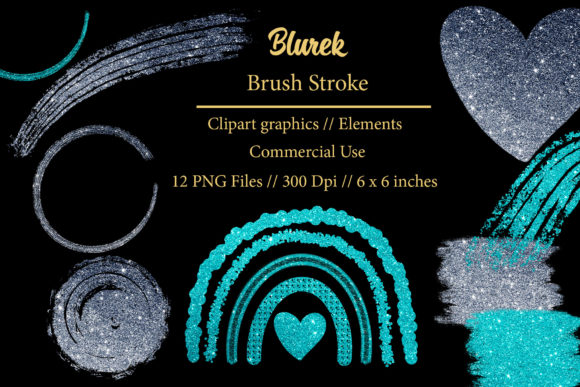
Before diving into design applications, it is crucial to understand the technical foundation of the product. The Blurek Brush Stroke Clipart Element package includes 12 individual transparent PNG elements contained within a single .ZIP file. Upon downloading, the first step in your workflow should be extraction and organization. Because these are digital products, proper file management prevents loss and ensures quick access during intense work sessions.
Each element is rendered at 300 dpi with dimensions of 6 x 6 inches. This resolution is critical for professional output. While 72 dpi is standard for screen-only viewing, 300 dpi is the industry benchmark for high-quality printing. This means you can confidently use these elements for physical products such as invitations, business cards, and stationery without worrying about pixelation or blurriness. The transparent background of the PNG format is equally important. It allows for seamless layering over any color, pattern, or photograph, eliminating the need for complex masking or background removal tasks in software like Adobe Photoshop, Illustrator, Canva, or Procreate.
To prepare for usage, create a dedicated folder on your drive or cloud storage labeled "Design Assets – Brush Strokes." Inside, keep the original ZIP file for backup and an extracted folder for immediate access. If you use design software that supports libraries or assets panels, consider importing these PNGs there for drag-and-drop efficiency. This preparatory step minimizes interruptions when you are in the flow of creating, allowing you to focus on composition rather than file hunting.
Strategic Applications in Branding and Marketing
One of the most powerful uses of the Blurek Brush Stroke Clipart Element is in branding and marketing materials. In a saturated digital landscape, brands strive for authenticity and human touch. Digital brush strokes provide an organic contrast to the rigid geometry of standard corporate design, adding warmth and personality.
For logos and business cards, these elements can serve as dynamic underlines, frames, or accent marks behind typography. They break the monotony of clean lines and suggest creativity and movement. When designing blog graphics or social media headers, placing a brush stroke behind key text highlights the message and draws the viewer’s eye. This technique is particularly effective for call-to-action buttons or promotional banners where visibility is paramount.
In advertising and web decor, consistency is key. By using the same set of brush strokes across different platforms—your website, email newsletters, and paid ads—you create a cohesive visual identity. The 12 unique variations in this pack allow for diversity while maintaining a unified style. For instance, you might use a bold, thick stroke for main headlines and a thinner, more delicate stroke for subheaders or decorative borders. This hierarchical use of assets helps guide the user’s journey through your content logically and aesthetically.
Enhancing Print-on-Demand and Physical Products
The versatility of the Blurek Brush Stroke Clipart Element extends significantly into the realm of print-on-demand (POD) and DIY physical products. Because the files are high-resolution (300 dpi), they are perfectly suited for sublimation designs, fabric printing, and merchandise creation.
Consider the production of mugs, t-shirts, and tote bags. A common challenge in POD design is making simple text-based designs look premium. Adding a brush stroke element behind or around the text instantly elevates the design, giving it a custom, hand-painted feel that customers often associate with higher value. For sublimation designs, the transparent PNGs ensure that the ink bonds correctly with the substrate without unwanted white boxes or edges, resulting in a professional finish.
For those involved in planner goodies and stationery, these elements are invaluable. You can incorporate them into printable planner pages, stickers, and journal inserts. The organic shapes complement the structured grids of planners, softening the layout and making it more inviting for users. If you are creating invitations for weddings, birthdays, or corporate events, brush strokes can frame the essential details, adding an elegant, artistic touch that standard clip art cannot achieve. The ability to scale these 6x6 inch elements up or down without significant quality loss (within reasonable limits) provides flexibility for various print sizes.
Workflow Integration and Efficiency Tips
To truly benefit from the Blurek Brush Stroke Clipart Element, it must be integrated smoothly into your daily workflow. Here are practical tips for maximizing efficiency:
- Layer Management: When working in layered design software, always place brush stroke elements on separate layers below your text or main subject. This non-destructive approach allows you to adjust opacity, blend modes, and position without affecting other design components.
- Color Customization: Although these are PNGs, many design tools allow you to apply color overlays or blending modes. Experiment with multiplying the brush strokes onto colored backgrounds or screening them over photos to create unique textures that match your brand palette.
- Consistency Checks: Before finalizing any project, review how the brush strokes interact with other elements. Ensure they do not obscure critical information. Use them to enhance readability, not hinder it. For example, if a stroke is too dark behind black text, reduce its opacity or choose a lighter variation from the 12 available options.
- Template Creation: If you frequently create similar types of content, such as weekly blog posts or monthly newsletters, build templates that include pre-positioned brush stroke elements. This reduces setup time for each new piece of content, allowing you to simply swap out text and images while maintaining a consistent aesthetic.
Long-Term Value and Asset Management
Purchasing digital products like the Blurek Brush Stroke Clipart Element is an investment in your long-term creative capacity. Unlike subscription-based stock photo services where access may lapse, owning these files means they are permanently available for your use. This reliability is crucial for maintaining brand consistency over years of operation.
As your skills grow, so will your usage of these assets. You may start by using them simply as backgrounds, but eventually, you might combine multiple strokes to create complex compositions or mask images within their shapes. The 12 individual elements provide enough variety to prevent repetitive designs while being cohesive enough to maintain a signature style. Regularly revisiting your asset library and experimenting with new combinations can reignite creativity during periods of designer’s block.
Furthermore, these elements are compatible with a wide range of software ecosystems. Whether you are a professional using Adobe Creative Cloud, a marketer using Canva, or an educator using PowerPoint, the universal PNG format ensures accessibility. This cross-platform compatibility removes technical barriers, allowing you to focus on the creative aspect of your work rather than troubleshooting file formats.
Conclusion
The Blurek Brush Stroke Clipart Element is more than a decorative addition; it is a functional tool that enhances the quality and efficiency of your creative output. By understanding its technical specifications, exploring its diverse applications in branding and print, and integrating it strategically into your workflow, you can elevate your designs with minimal effort. Whether you are crafting professional marketing materials, personalized gifts, or educational resources, these high-quality, transparent PNGs provide the artistic flexibility needed to stand out in a competitive landscape. Embrace these assets as part of your core design toolkit, and watch how they streamline your process and enrich your visual storytelling.